Have you noticed that the things we experience are carefully planned for our comfort, not just on the internet but in general as well? We live surrounded by experiences in both the analogue and digital worlds. Referring to an experience we all can relate to, Instagram. This social media platform has garnered an immense following and has been praised for its seamless navigation and user-friendly interface.
The layout of the platform enables users to effortlessly scroll through the content for extended periods without feeling overwhelmed. The visual harmony and order on Instagram are one of the platform’s distinctive features that undoubtedly add to the overall user experience.
Doesn’t this make you wonder what makes a few of them more popular than the rest? This is where the UI and UX come in. We all know that UI and UX are not the same concepts. But are they closely connected, even mutually penetrated and rarely exist without each other? Surely!
The Difference Between UI and UX Design
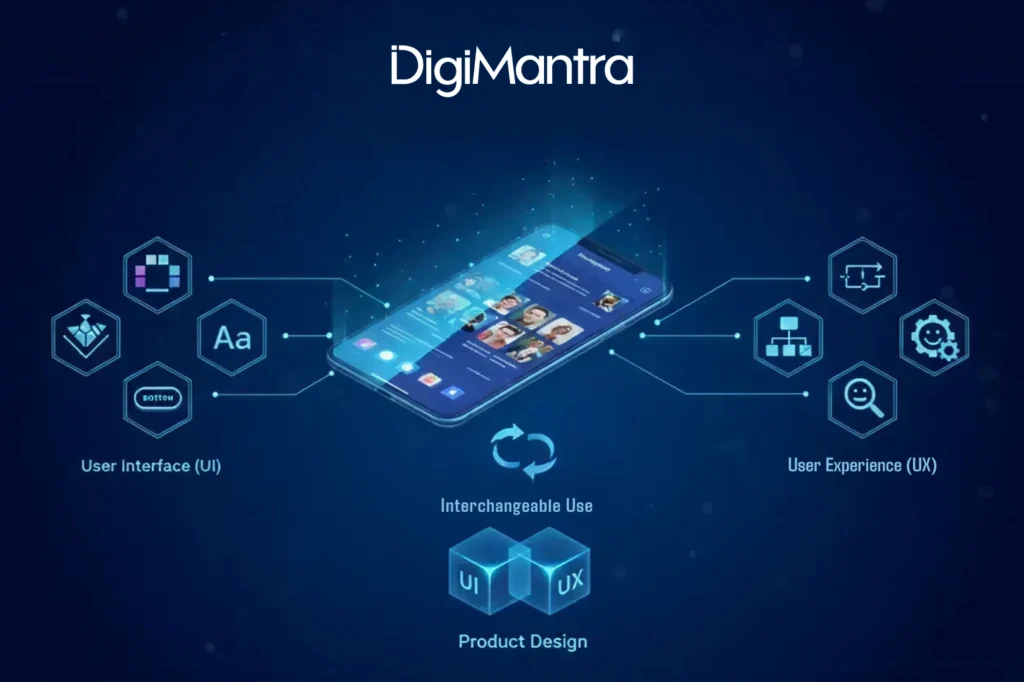
User Experience (UX) and User Interface (UI) design are two essential components of product design that work together to create an effective and enjoyable user experience. In product design, terms like “User Experience (UX)” and “User Interface (UI)” are quite commonly and interchangeably used.
In other words, the first is aimed at understanding how clients would react to a specific platform, while the second one is dedicated to optimizing the way the interface works.
During the development of any project, UX initiates the process by tracing the basic skeleton of the experience, like the order in which the texts, images or videos will appear, and the placement of call-to-action prompts that can translate into conversions.
Then the user interface designer fills the skeleton with relevant visual and interactive elements to ensure customer satisfaction.
“No product is an island. A product is more than the product. It is a cohesive, integrated set of experiences. Think through all of the stages of a product or service — from initial intentions through final reflections, from first usage to help, service, and maintenance. Make them all work together seamlessly.”
— Don Norman, inventor of the term “User Experience”
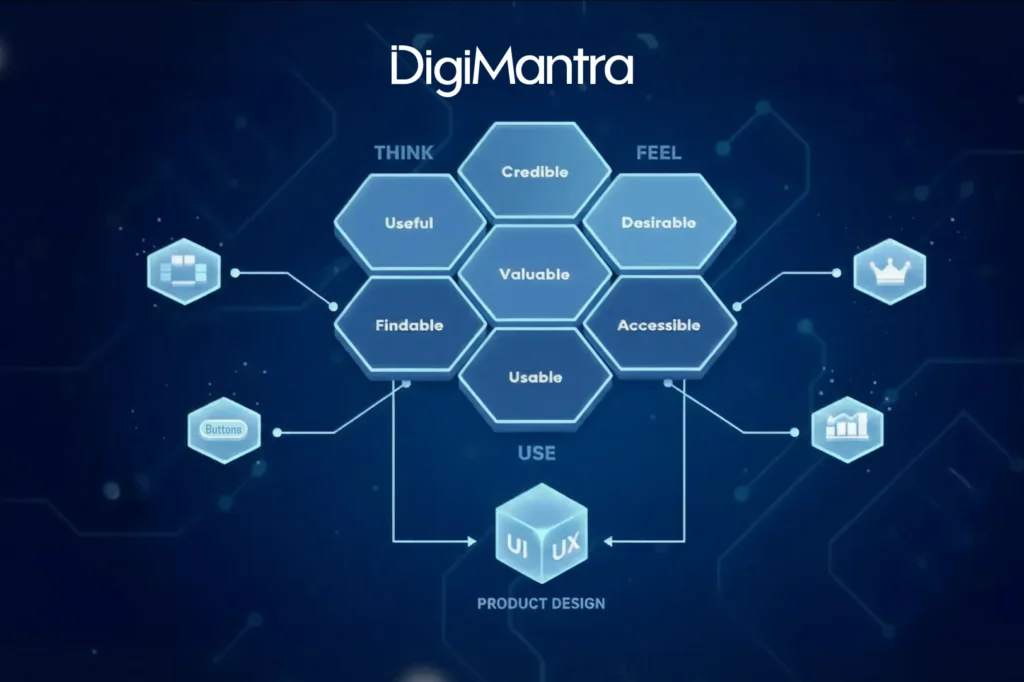
Peter Moreville, President of Semantic Studios, developed a great visual to highlight what goes into effective UX design.
This ‘usability honeycomb’ has become the foundation for best practices for UX designers guiding their efforts across multiple touchpoints with the user, including:
- Discovering your company’s product
- The sequence of actions taken to interact with the interface
- Thoughts and feelings that arise as they try to accomplish their task
- Impressions are taken from the interaction as a whole
UX designers ensure that the company delivers a product or service that meets the needs of the customer and allows them to seamlessly achieve their desired outcome.
“Design is not just what it looks like and feels like. Design is how it works”
-Steve Jobs
To elaborate further, when you search on Google, they make sure you know why those specific results are being displayed. They not only show you the results, but they also show you why they show you those results. They do this by bolding the keywords you typed in your search. Making your experience with Google dramatically different.
Google consistently delivers the experience. You can go ahead to access anything in the blink of an eye.

UI design combines various skills, including graphic design, wireframing, and prototyping, to create web applications. The process involves selecting elements like colour schemes, typography, visual hierarchy, and layout, all while ensuring the interface guides the user seamlessly through the product.
A user-centred approach is critical, where the goal is to make the interface intuitive and easy to navigate. For example, Google’s homepage is a prime illustration of this; its simple design with just a logo, search bar, and two buttons is not only minimal but highly user-friendly, offering users relevant information with just a click. The UI design process emphasizes creating interfaces that focus on user needs, with attention to individual elements like buttons, swipe and scroll motions, menus, typography, imagery, colours, and animations. Ultimately, the goal is to deliver a seamless, intuitive experience that is visually appealing and easy to use.
UI and UX design – The Differences
UX design is about the overall feel of the experience, while UI design is all about how the product’s interface looks and functions.
Let’s understand the gap better:
Purpose:
User Interface design primarily focuses on how a product’s surfaces look and function— including the layout, visual design, and interactive elements such as buttons, menus, and forms.
User Experience design, on the other hand, is focused on the user’s journey to solve a problem. It encompasses every aspect of the user’s interaction with a product or system, from the initial awareness and discovery stage to the actual usage and post-usage stages.
Application:
UI design is primarily applied to focus on the more tangible elements like the visual and interactive elements of a product or system, such as websites, mobile apps, and software interfaces.
UX design is concerned with the conceptual aspects of the design process and is applied to the entire user experience, including product design, service design, and the overall customer experience.
Focus:
UI design focuses on the presentation of the product or system, making it aesthetically pleasing and easy to use.
UX design focuses on creating a seamless and satisfying user experience, ensuring that the user’s needs are met at every stage of interaction with the product or system.
Creation Process:
UI design often involves creating wireframes, mock-ups, and prototypes, with an emphasis on visual design and layout.
UX design is based on extensive research, creating personas, designing wireframes and interactive prototypes, and testing designs to ensure that the user’s needs are fully understood and addressed.
Result:
UI design is a visually pleasing and easy-to-use interface that makes it simple for users to navigate a product or system.
The result of UX design is a positive user experience that meets the user’s needs and exceeds their expectations, resulting in increased customer satisfaction and loyalty.
|
|
UX
|
UI
|
| Purpose |
Designing from a human-first perspective. |
Create an aesthetic experience from a human-first perspective. |
| Application |
Digital and physical products |
Digital products |
| Focus |
Immersive, pleasant user experience |
Series of visual touchpoints for convenient interaction with the product. |
| The Creation Process |
Developing structural design solutions to address consumer needs. |
Combining buttons, colour palettes, images, and typography. |
| Result |
A user-friendly product that pleases users. |
A visually appealing, easy-to-use product. |
UI and UX are distinct concepts that work together to ensure user engagement and effective communication. For a digital transformation company, balancing both is essential to deliver meaningful digital experiences. It is common to encounter platforms that are visually appealing but difficult to use, or others that are highly functional yet visually unappealing. Both are classic examples of a mismatch between user interface design and the overall user experience—an issue a digital transformation company must address to create intuitive, user-centric solutions.
“UI is the saddle, the stirrups, and the reins. UX is the feeling you get being able to ride the horse.”
— Dain Miller, Web Developer, UX and UI complement each other, and in today’s competitive marketplace, getting both aspects right is an absolute must.